
Enlight1.2.9 - App Store
You'll be able to see results in few seconds.
Publisher Description
The best all-in-one photo editor provides powerful tools that are easy to use." - Apple, Inc.
Selected as the *2015 App of the Year* by the App Store in the UK, Australia, Germany, Canada, France, Russia, China and India! Runner-up App of the Year in the US.
...An iPhone-photographer s dream app...manages to strike the right balance between traditional Photoshop-like controls and artistic filters and effects. - Karissa Bell, Mashable.
_______________________________________________
Wish you didn't have to use so many apps to edit a single photo? You don't.
Download Enlight - it s every photo app you ve ever needed, wanted, or dreamed of - combined into one powerful, beautifully designed photo editor.
More praises about Enlight:
#1 Photo and Video App in 128 countries & #1 Top Paid App in 121 countries!
Enlight packs so many features into its clean and easy-to-use interface that it effectively replaces most standalone apps. - Jason Parker, CNET
Advanced features such as tone curves, custom presets, and amazingly beautiful and customizable filters have made Enlight one of my go-to image editors. - Ally Kazmucha, iMore
Enlight is a powerful Photoshop-like app, minus the steep learning curve. - Les Shu, Digital Trends.
_______________________________________________
Enlight is the superior way to create stunning images on iPhone. The most comprehensive, highest quality photo editing app so powerful and user-friendly it ll be the last photo app you ever download.
Enlight offers:
Image Perfection
Precise & selective control over tone, color, and details
Create and save your own unique presets
Built-in masking within every tool allow you to seamlessly blend effects
Analog & Duo Filters
Reproduce the style of classic cameras and vintage film
Revitalize colors with two-toned gradients
Add light leaks and custom vignetting for a retro feel
Black & White Photography
Discover the magic of monochromatic photos with darkroom-inspired techniques
Signature presets dedicated to stunning b&w photo conversion
Add artistic touches with film intensity, grain, and fade
An Artist s Dream
Easily convert your photos into artistic masterpieces
Create amazing painterly effects
Convert any image to unique street art
Transform your photos into realistic looking sketches
Decorative Touches
Personalize: draw, write, or doodle directly on your image
Decals & special effects add-ons make your photo unique
Add and customize text, borders, frames, and more!
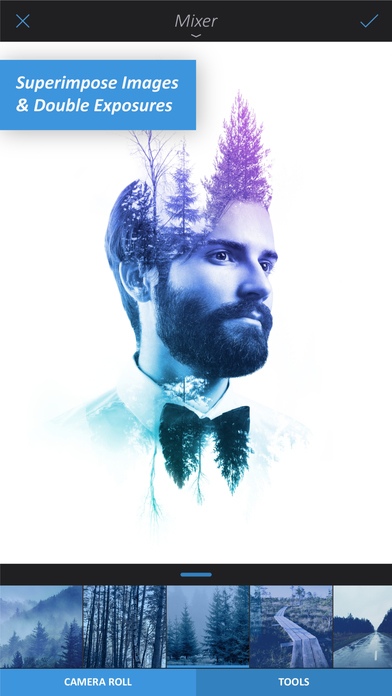
Photo Mixer
Overlay two photos to produce a double exposure effect
Create photo montages for impressive surrealistic results
Seamlessly merge photos with various blending modes
Intelligent Photo Correction
Instantly repair under or over-exposed photos
Bring out lost details with a simple swipe
State-of-the-art noise reduction tool
Clone/Heal tool allows for seamless removal of defects
Power Tools
Bloat, shrink, or reshape specific objects in the photo
Linear, mirror, and radial tilt-shift options to shift focus
Multi-channel curves for ultimate control over image tonality
Universal masking for precise control over every effect
Crop Options
Flip, rotate, and straighten crooked photos
Perspective: vary the photo as if taken from a different angle
Social Media Heaven
Create funny memes to share with friends
Design unique photo collages with a variety of templates
Share your amazing results directly to social media
Share multiple photos at once
Innovative Workflow
Not finished editing? Auto-save photo sessions, continue later
Compare your work to the original with before & after
Choice of export quality (JPEG, PNG or TIFF)
Real time 50MP editing on iPad Pro
Real time 35MP editing on iPhone 6S/6S Plus, iPad Air 2 & iPad Mini
Real time 19MP editing on iPhone 6, 6 Plus, 5S, 5, 5C & iPad 3/iPad Mini 2
Animate your editing sessions to show your workflow
Download now!
Requires iOS 8.1 or later. Compatible with iPhone, iPad, and iPod touch.
About Enlight
The company that develops Enlight is Lightricks Ltd.. The latest version released by its developer is 1.2.9.
To install Enlight on your iOS device, just click the green Continue To App button above to start the installation process. The app is listed on our website since 2015-03-12 and was downloaded 0 times. We have already checked if the download link is safe, however for your own protection we recommend that you scan the downloaded app with your antivirus. Your antivirus may detect the Enlight as malware if the download link is broken.
How to install Enlight on your iOS device:
- Click on the Continue To App button on our website. This will redirect you to the App Store.
- Once the Enlight is shown in the iTunes listing of your iOS device, you can start its download and installation. Tap on the GET button to the right of the app to start downloading it.
- If you are not logged-in the iOS appstore app, you'll be prompted for your your Apple ID and/or password.
- After Enlight is downloaded, you'll see an INSTALL button to the right. Tap on it to start the actual installation of the iOS app.
- Once installation is finished you can tap on the OPEN button to start it. Its icon will also be added to your device home screen.
Program Details
System requirements
Download information
Pricing
Version History
version 1.2.9
posted on 2015-03-12
Disclaimer
Official App Store Link
We do not host Enlight on our servers. We did not scan it for viruses, adware, spyware or other type of malware. This app is hosted by Apple and passed their terms and conditions to be listed there. We recommend caution when installing it.
The App Store link for Enlight is provided to you by apps112.com without any warranties, representations or guarantees of any kind, so access it at your own risk.
If you have questions regarding this particular app contact the publisher directly. For questions about the functionalities of apps112.com contact us.
